Box Scores & Stats
Entering box scores, the way an actual scorer wants
You sit on the bench, you type the line, you hit save. Every leaderboard, every team standings row, every player average updates automatically -- because they're all built from the same box scores you just entered. This walks through the entry flow, DNP handling, after-the-fact corrections, and bulk CSV import.
Before you start
- A season created with at least one game on the schedule
- Rosters loaded on both teams in the game -- bulk import or add manually
- The game's final score entered (used to sanity-check your box score totals)
- A paper scoresheet, tablet, or photo of the final box score to type from
Pick which stats your league actually tracks
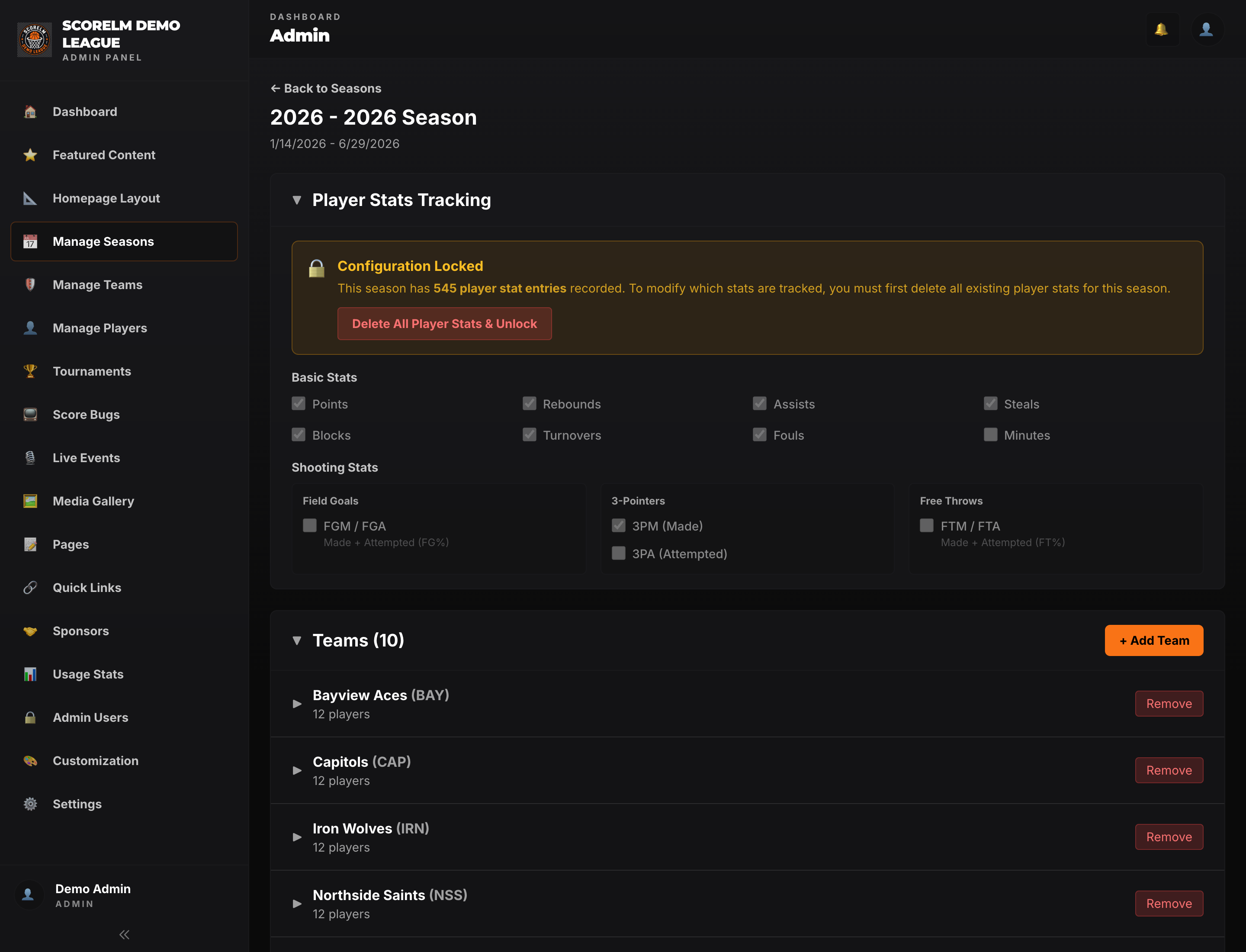
Before your season starts, open the season in the admin panel and choose which stats your scorers will actually track. Toggle on what they can realistically count -- points, rebounds, assists, steals, blocks, 3PM are the usual core. Leave the rest off. If your scorers can only track FGA and not 3PA, untoggle 3PA. Every column you disable disappears from the box score entry grid and from every leaderboard. You can change this mid-season, but it's cleaner to lock it in once before week one.
Open the box score entry for a finished game
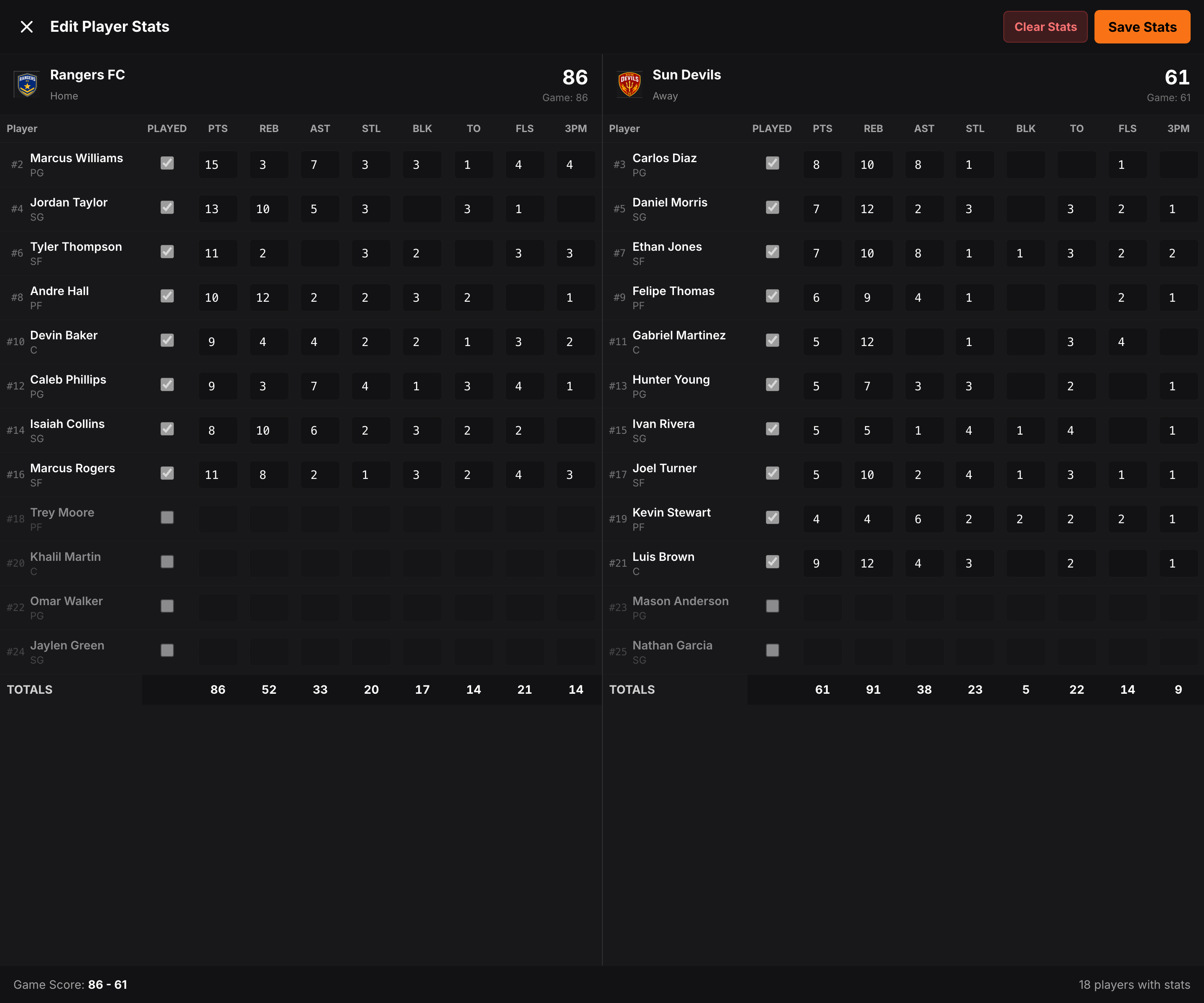
After a game wraps, go to the game in the admin schedule and hit 'Enter Stats'. You'll get a full-screen, two-panel grid: home team on the left, away team on the right. Each row is a player from that team's roster. Each column is a stat your season is tracking. The far-left checkbox is 'Played' -- by default everyone on the roster starts as DNP.
Type the line in
Tab through the cells and type the numbers off your scoresheet. The moment you enter any non-zero stat for a player, 'Played' flips on automatically. Click a cell to select-all so you can overtype without backspacing. Each column has a sensible max -- you won't accidentally type 1000 points instead of 10. As you type, the team totals at the bottom update live and the score readout in the header shows your point total vs the recorded game score. If they don't match, you get an orange warning at the top so you can find the missing line.
Mark DNPs explicitly (or just leave them)
If a player was on the bench in uniform but never checked in, leave their row alone -- it stays DNP and nothing gets saved for them. If a player was on the bench injured or away on travel and you want that recorded, leave their stats at zero but toggle 'Played' off so the row reads as DNP on their game log. If you mark 'Played' on with all zeros (rare -- garbage-time guy who didn't score), that's fine too. The one rule: you can't toggle Played OFF if any stat for that player is non-zero. Clear the line first.
Save it
Hit Save Stats. Every player you touched is saved; anyone you didn't touch stays DNP. If you re-open the entry later, your numbers reload exactly as you left them. Any row you clear and save again is removed -- the save is authoritative, not additive. Per-season leaderboards, team standings, points-for/against totals, and the player's career averages all update on the next public page load.

Fix things after the fact
Spotted a typo three days later? Open the same game's box score entry -- everything you saved is editable. Change the numbers, hit Save again. The leaderboard, the standings, and the team's points-for refresh on the next public page load. There's nothing to 'recalculate' -- every leaderboard adds up the box scores on the fly, so a correction propagates everywhere automatically. If you need to wipe the entire game's stats and start over, the Clear Stats button has a 'Delete saved stats' option for that.
Bulk import via CSV when you're catching up
If you're loading in a half-finished season from a spreadsheet, use the bulk import flow in Players to get rosters in first, then enter box scores per-game. CSV import has a preview mode -- it'll tell you which rows would create, update, skip, or error before anything is actually saved. Three modes are supported: create-only (add new only), skip-existing (add new, leave existing alone), and update-existing (add new, update matches). Max 1000 rows per upload.
Pro Tips
Tips from years of typing stats off a paper scoresheet
The stuff that makes the difference between clean stats and an asterisk-riddled season-end leaderboard.
Set the stat config before the season starts
It's much easier to decide up front that your league only tracks PTS / REB / AST / STL / BLK / 3PM than to enable steals halfway through and have a leaderboard where the first six weeks show zero. Match the config to what your scorers will realistically count game-to-game.
Reconcile to the game score before saving
If the orange 'totals don't match game score' warning is showing when you go to save, you almost certainly missed a player line or fat-fingered a number. The header tells you exactly how many points off you are. Twelve seconds of checking now saves you a Slack message at midnight from a player asking why his three-pointer didn't count.
DNP is a real state -- use it
Leaving a player off entirely and explicitly marking them DNP look the same on the public site, but the DNP is the honest record. Use it for injuries, suspensions, and travel absences. DNP games never count against a player's averages, so a DNP never drags down a player's PPG.
Don't auto-update the game score from box scores
The game's recorded final score is the source of truth. The box score grid will warn you if your player totals don't match, but it won't silently overwrite the game score to make them match. If there's a mismatch, fix the box score, not the game record (unless the game record itself is wrong -- in which case edit that separately).
Use 'Reset Form' before 'Delete saved stats'
Reset Form clears the on-screen numbers but doesn't delete anything saved -- you can re-enter and save fresh. Delete saved stats wipes that game's box score permanently. If you're just starting over because you mistyped the wrong game's numbers, Reset is what you want.
Stats are derived, never duplicated
Every leaderboard, every per-game average, every team standings row is added up live from your box scores on the fly. There's no cached 'season points' field that can fall out of sync. A correction made today fixes the entire season's data retroactively, automatically.
How leaderboards stay consistent
One rule: every stat anywhere in ScoreLM is built from your box scores. There are no separate totals to keep in sync. Fix a typo in a box score and every leaderboard, standings row, and player average updates everywhere.
Per-game averages skip DNPs
PPG, RPG, APG and all the rest divide by games-played, not games-on-roster. A player with 5 DNPs and 10 games played gets divided by 10, not 15. DNP games never drag down their average.
Standings have a separate source
Wins, losses, and points-for/against in the standings come from each game's final score, not the summed box scores. This is why mismatch warnings exist -- the two should agree, but the game record wins. Basketball supports W/L, FIBA 2-1-0, and FIBA 3-2-1-0 ranking systems.
Type the line, hit save, move on
A clean box score takes about ninety seconds per game once you're in the rhythm. Everything downstream -- leaderboards, standings, player profiles -- just works.